Tuesday, 7 August 2012

Each person has their own likes and dislikes, and the same applies to PC users and their software: while some are satisfied with a certain application, others might require different functions or prefer a simpler interface. When it comes to audio players, everyone is bound to find the one that suits their needs perfectly. And for some, AIMP is the solution.

After extracting the files, users need to choose the installation mode they want: portable version (for removable devices) or custom version (recommended), in a single user or multi user mode. The entire pack contains main components, skins, visualizations, input plugins, additional components (e.g. audio library, Internet radio browser, the Last.FM plugin), and languages. One can choose between full, lite, minimal and custom installation.

To ensure AIMP is seamlessly integrated within Windows, users can automatically associate the software with audio and playlist formats on the PC, as well as add a menu item to the context menu of Windows Explorer.

At first sight, the overall text and graphics might seem to be a bit tiny, considering the latest trends in software technology (with big icons, text, images etc), however after spending some time using AIMP, this is no longer an issue.

The interface somewhat resembles Winamp's, so that the playlist is visible, while the actual audio player and the visualization section are in the upper side of the window. Within the playlist, users get the possibility to rate their songs according to their tastes.

Unlike other applications dedicated to audio playback, AIMP comes with an auto-shutdown feature, an alarm clock, a quick search for songs, and the possibility to add songs as bookmarks. Furthermore, users can customize the hot keys if they are not satisfied with the default ones.

The quality of sound is pretty good, especially considering AIMP supports a wide range of formats, including but not limited to OGG, MP3, WMA, WAV, and others. Typically, the software runs smoothly and the CPU usage is kept to a minimum.

In a nutshell, AIMP can easily become the favorite audio player on one's computer, due to the numerous features it brings, the intuitive interface and customizable settings.
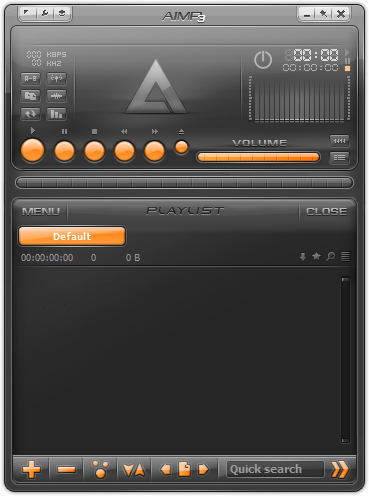
AIMP  3.10 Build 1072 Description


AIMP is more than an audio player: it supports numerous audio formats (including OGG, MP3, WMA, WAV, OGG etc), it includes an audio converter, an audio ripper, an audio recorder, a tag editor and lots of other features. You can also download additional plugins and skins from the official website.

Mediaplayer - qualitative and pure playing multimedia of files, including mp3; good facilitys, the small size and minimal use of system resources.

Note: Free for non-commercial use.
Here are some key features of "AIMP":

· Crystal-clear sound, technology of reproduction essentially differs from Winamp and WMP;
· Sensitive equalizer;
· A maximum of functionality from a minimum of resources;
· The minimal consumption of system resources;
· Multilingual support;
· Support of set of formats of audio
· Adjustment of global and local hot keys (patterns from WinAmp and WMP);
· Flexible options of the program and various covers will allow you to make A.I.M.P. completely individual;
· Support of plug-ins with which help it is possible to expand opportunities of the program;
· The audioconverter codes music from the most different formats in wma, mp3, wav, ogg;
· audioGrab allows to overtake AudioCD in Mp3, OGG, WAV or WM;
· The sound recording will allow you to write down a sound from any audio of the device in system;
· The built - in editor of tags, support WMA, MP3, OGG;
· An opportunity of record AudioCD, MP3-disks and disks with given
Requirements:

· Sound Card
· DirectX 8.1 or above
· 3 Mb at HDD


What's new in AIMP 3.10 Build 1072:


· Common: Localizations has been updated
· Sound Engine: The algorithm of advanced channels processing has been improved
· Skin Engine: Compatibility with AIMP2 skins has been improved
· Plugins: Rendering speed of visualizations has been increased
· Plugins: Compatibility with Last.fm Client v2 has been improved
· Fixed: The Audio Converter ignores command line switches
· Fixed: The Audio Converter raises an exception, if "move output to..." options is active and target path is empty
· Fixed: The Audio Converter increases tempo of composition twice when encoding to MP3 Mono format
· Fixed: Player used to jump over one track after deleting file from the playlist in some cases
· Fixed: Player resumes playback on startup incorrectly, if previously playing file has been removed from the playlist
· Fixed: Player resumes playback queue incorrectly, if two or more playlists has same name
· Fixed: Incremental search does not work in the Tag Editor's genre selector menu
· Fixed: The Audio Library does not suggest to create a new group in some cases when navigating by fields values
· Fixed: %IN macros is expanded incorrectly when sending files from playlist to external directory
· Fixed: Small bugs and defects

download
  
NoteWhy Restfile is the Best!
  • Every member can Maximum download speed 
  • Unlimited Download Speed
  • No Time Waiting
  • No Count Downs
  • Download Accelerator Supported
  • Resume/Pause Support
  • Free download for all part of world. 
  • No need to install any Toolbar, Spyware etc.
  • Every member is a premium member. Free Registration for high download speed, no time waitings.      

Sunday, 5 August 2012

When you delete files from your PC, you don't really wipe them away forever. The system simply marks that space as reusable, which means that erased files can be actually be recovered with apps like PC Tools File Recover.
This program features three different modes (Quick, Deep and Physical) to scan your computer in search of previously erased files. I specially liked the possibility to filter this scan, either by file type, file size or even specifying letters or words that must be found in the file's name.
Of course, the most thorough the scanning method you choose, the longer it will take to be completed. On the upside, a Deep scan shows far more results than the Quick one and the Physical scan can be useful in case of corrupt hard drives.
However, I was disappointed to see that this trial version doesn't allow you to recover any files. It scans your PC and displays the list of all erased files, but if you want to recover any of them you'll need to register the program. I understand this is a shareware version, but I think users would like to have some kind of guarantee that they'll be able to recover their data. And maybe a good way to do so would be to have a fully functional version for a limited period of time, or at least allow users to recover a few files before registering the program.

PC Tools File Recover 9.0.1.221 description

Recover files instantly, with this easy-to-use file and data recovery software.


PC Tools File Recover 9.0.1.221 is a powerful tool that helps you recover and restore deleted files from any type of storage device. File Recover allows you to recover critically important documents, or other files, which have been lost by accidental deletion. These files may be lost by emptying the Recycle Bin, or using other deletion actions that bypass the Recycle Bin altogether.

Such actions include Windows Shift-Delete, command line deletion, deleting excessively large files or using applications that delete files without the Recycle Bin. When a file is deleted from the Recycle Bin, or if the recycle bin is bypassed altogether, the file can no longer be recovered by the Windows Operating system.

The content of the file still remains on the drive, relatively intact, until the section of the drive it occupies is overwritten by another file. File Recover identifies the contents of such lost files on the hard drive and allows you to recover them.

If a file has been partially overwritten, File Recover attempts to reconstruct as much of the file as possible with the remaining contents. This allows you to salvage at least part, if not all, of that recovered file to continue using it as required.

Here are some key features of "PC Tools File Recover 9.0.1.221":

· Restores files from hard drives, floppy disks and other types of fixed media
· Powered by a rapid scan engine that can find and recover lost files in minutes
· Allows you to specify what drives you want to scan, the file types you want to scan for, the size of your files, and even the file names you want to find and recover
· Utilizes a non-destructive, read-only file recovery approach that won’t damage your lost files
· Supports IDE/ATA/SCSI hard drives
· Supports hard drives formatted with FAT16, FAT32 and NTFS file systems
PC Tools File Recover 9.0.1.221 Requirements:

· Pentium 4 or equivalent 233 Mhz minimum, (Core 2Duo or equivalent 300 Mhz recommended)
· 64 MB minimum (128 MB recommended)
· 50 MB free disk space
· 1024x768 screen resolution
· CD-ROM drive (if not installing via electronic software download)
· Internet access is required to register product and receive product updates)

 What's New in This Release:

· New filters have been added
· File type detection while scanning
· Preview support specific file types
· GUI Unicode support and Scan pause function

download
  
NoteWhy Restfile is the Best!
  • Every member can Maximum download speed 
  • Unlimited Download Speed
  • No Time Waiting
  • No Count Downs
  • Download Accelerator Supported
  • Resume/Pause Support
  • Free download for all part of world. 
  • No need to install any Toolbar, Spyware etc.
  • Every member is a premium member. Free Registration for high download speed, no time waitings.      

Saturday, 4 August 2012

For a long time, the fight for the supremacy of the browser kingdom has involved just two major players: Mozilla's Firefox and Microsoft’sInternet Explorer, each trying to attract more users with their functionality. However, the search engine giant Google has decided to enter the battle with its very own solution: Google Chrome. 

Since its launch in 2008, Google’s browser has quickly attracted attention and users no longer install it only to check out a new app, since it already showed that it can be just as stable and feature-packed as the dedicated browsers. 

Installation is extremely easy due to the simple setup pack that makes the whole task just a matter of clicking “Next” a few times, along with some options that are far from complicated. 

The interface is clean and pleasant, but those who do not really like it can easily apply themes, so that every one can bring their very own touch to an otherwise static app. Being focused on leaving the user plenty of room for viewing the visited webpage, the interface is kept as minimalistic as possible, with the address bar featuring all the buttons one might require for navigation.

Another way to customize Google Chrome and make it more suitable to one's needs is to install extensions – Google has created a comprehensive Webstore for these extensions, where users can find basically any type of app or extension, ranging from education to games, lifestyle and blogging.

A novelty introduced by Google Chrome is the fact that when the user visits more than a single website, more processes are started, so that if one of the webpages crashes, the user can simply terminate its tab (and implicitly its process), without closing the whole browser. 

Also, this browser places a lot of emphasis on user privacy, so the Incognito Mode was created. It allows users to explore the Internet the usual way, but when the app is closed, it automatically erases all cookies and history it may have created, thus ensuring one's privacy is maintained. 

The freeware license and the frequent updates convince more and more users to take this browser into consideration. Designed with simplicity in mind, it is an easy to use app that can become a powerful package if the user chooses to install add-ons. This makes it the perfect browser basically for every type of user out there.

Google Chrome 21.0.1180.60 Description


Google Chrome was developed to be a browser that combines a minimal design with sophisticated technology to make the web faster, safer, and easier.

One box for everything
Type in the address bar and get suggestions for both search and web pages.
Thumbnails of your top sites
Access your favorite pages instantly with lightning speed from any new tab.
Shortcuts for your apps
Get desktop shortcuts to launch your favorite web applications easily and quickly.
Here are some key features of "Google Chrome":

· Speed: Fast to launch, fast to load web pages
· Quick to start up from your desktop
· Loads web pages in a snap
· Runs web applications faster than ever

· Simplicity: Designed for efficiency and ease of use
· Search and navigate to web pages from the same box
· Arrange and organize tabs however you wish — quickly and easily
· Get to your favorite websites with just a click, from the thumbnails of your most visited sites in the New Tab page

· Style: Themes to add delight to your browser
· Try Minimalist, Star Gazing, or Google Chrome Artist Themes.

· One box for everything
· New Tab page
· Application shortcuts
· Dynamic tabs
· Crash control
· Incognito mode
· Safe browsing
· Instant bookmarks
· Importing settings
· Simpler downloads


What's new in Google Chrome 21.0.1180.60 Stable:


· [127522] Low CVE-2012-2847: Missing re-prompt to user upon excessive downloads.
· [127525] Medium CVE-2012-2848: Overly broad file access granted after drag+drop.
· [128163] Low CVE-2012-2849: Off-by-one read in GIF decoder.
· [130251] [130592] [130611] [131068] [131237] [131252] [131621] [131690] [132860] Medium CVE-2012-2850: Various lower severity issues in the PDF viewer.
· [132585] [132694] [132861] High CVE-2012-2851: Integer overflows in PDF viewer.
· [134028] High CVE-2012-2852: Use-after-free with bad object linkage in PDF.
· [134101] Medium CVE-2012-2853: webRequest can interfere with the Chrome Web Store.
· [134519] Low CVE-2012-2854: Leak of pointer values to WebUI renderers.
· [134888] High CVE-2012-2855: Use-after-free in PDF viewer.
· [134954] [135264] High CVE-2012-2856: Out-of-bounds writes in PDF viewer.
· [136235] High CVE-2012-2857: Use-after-free in CSS DOM.
· [136894] High CVE-2012-2858: Buffer overflow in WebP decoder.
· [Linux only] [137541] Critical CVE-2012-2859: Crash in tab handling.
· [137671] Medium CVE-2012-2860: Out-of-bounds access when clicking in date picker.


download
  
NoteWhy Restfile is the Best!
  • Every member can Maximum download speed 
  • Unlimited Download Speed
  • No Time Waiting
  • No Count Downs
  • Download Accelerator Supported
  • Resume/Pause Support
  • Free download for all part of world. 
  • No need to install any Toolbar, Spyware etc.
  • Every member is a premium member. Free Registration for high download speed, no time waitings.      
 
RealPlayer is an all-in-one media player that's able to play virtually all multimedia files out there, while offering users a bunch of extra features.

The installer is full of options, allowing to choose right from the beginning whether to place shortcuts on desktop, to use RealPlayer for opening multimedia files that are not yet associated with another application or to install some other applications that have nothing in common with RealPlayer. 

This is the reason why RealPlayer is marked as ad-supported, as it attempts to install two additional tools, both of which are not required for the program to work properly.

The application may not surprise you at the first sight, as RealPlayer greets the user with its now well-known browsing window. The interface is simple, yet stylish and comprises the player itself, a Library section that allows you to organize your media content and a CD burner.

RealPlayer has support for most audio and video formats out there, boasting the same features as many other digital media players out there, including playlists, libraries, equalizers and even burning capabilities. Of course, RealPlayer also allows you to listen to online radio stations, as the app includes over 3200 stations from all over the world. 

What we liked the most was definitely the fact that RealPlayer can handle basically all multimedia files on your computer, but on the other hand, a few interface upgrades here and there would be great.

RealPlayer acts as a multimedia center for your computer. It is not just a player, but it can also be tagged as a media organization tool and a CD burning utility. All of these, together with its accessibility and ease of use make it worth your while.


RealPlayer description


RealPlayer is an advanced media player and organizer. It's social. It's portable. It's the new RealPlayer SP. And it's perfect for playing and sharing video with your friends and followers on Facebook and Twitter. You'll also be happy to know it works easily with your favorite flavors of Blackberry, iPod, iPhone and game systems. Now you can download and organize your favorite videos from YouTube and thousands of other sites. Then watch them anytime, anywhere you want.

The new video converter makes it easy to copy online video to your iPod, cell phone, Xbox, PS3 or other favorite device. RealPlayer SP is the easiest way to share your favorite videos--with your favorite people--on your Facebook page or Twitter feed. Take your media experience to the next level with RealPlayer Plus. Its advanced video features let you burn DVDs with a single click.
Here are some key features of "RealPlayer":

Online Radio:
· Over 3200 stations worldwide & 60 ad-free stations for endless listening.

Expanded Controls:
· Optimize sound with the 10-Band Graphic Equalizer and get the sharpest picture with advanced video controls.

Advanced CD Burning:
· Rip, mix & burn CDs like a pro - fast! Encode MP3s at up to 320kbps.

Play Everything:
· RealOne Player plays all major media formats including Quicktime MPEG-4, Windows Media, DVDs, & more.

Easy, Fun & Intuitive:
· Browse the web, organize audio & video files, create playlists, & more!
Requirements:

· 1 GHz processor or greater (supports simultaneous record/playback features)
· 512 MB of RAM, 1 GB
· High-speed internet connection (audio/video)
· Full Duplex sound card and speakers
· CD and DVD writer (for CD and DVD writing features)
· DVD player and DVD playback software (for DVD playback)
· 4+ GB available disk space for saving media, and for creating CDs or DVDs


What's New in This Release:

· Updates for compatibility with Firefox.
· Updates for compatibility with Google Chrome.
· Fixed an issue with viewing certain websites in the RealPlayer browser.
Users are advised to pay attention while installing this ad-supported application:

· Offers to download or install software or components that the program does not require to fully function
· Offers to create desktop or start menu shortcuts for items unrelated to the program's functionality
· Displays ad banners or other types of advertising material during its runtime


download
  
NoteWhy Restfile is the Best!
  • Every member can Maximum download speed 
  • Unlimited Download Speed
  • No Time Waiting
  • No Count Downs
  • Download Accelerator Supported
  • Resume/Pause Support
  • Free download for all part of world. 
  • No need to install any Toolbar, Spyware etc.
  • Every member is a premium member. Free Registration for high download speed, no time waitings.      
 

IDM+6.10+BetaInternet Download Manager is a powerful download manager that promises to accelerate downloads by up to 500 percent. In addition, the application can also restart interrupted downloads and integrate into a large number of browsers, including Internet Explorer,Firefox, Google Chrome and Opera.

Internet Download Manager's interface is clean and well-organized, with large, stylish buttons that facilitate the management of the files in process. It is a great organizer too, as every single download can be moved into a different folder, depending on its type. Plus, it has a rich settings menu where you can change the way the program handles certain file formats or the default download locations.

We tried the quick update function too, which worked like a breeze and basically updated the application with just a single click. It all came down to choosing whether to update or not, and the whole job was done by the integrated updater that automatically downloaded the new files and installed them on the computer.

The application encases all the features specific to a decent download manager, including drag and drop support, a task scheduler, virus protection, queue processor, HTTPS support, progressive downloading with quotas, command line parameters, sounds, ZIP preview and proxy servers.

The tests revealed that the CPU and memory footprint is minimal, but this also depends on the download speed and the overall size of the file.Internet Download Manager is a must have application for many users out there. It will prove itself essential for users who download large files on a regular basis.


Internet Download Manager v6.12 beta build 8 (IDM v6.12 beta build 8) Download MediaFire Description

internet Download Manager (IDM) is a tool to increase download speeds by up to 500 percent, resume and schedule downloads. 

Comprehensive error recovery and resume capability will restart broken or interrupted downloads due to lost connections, network problems, computer shutdowns, or unexpected power outages. Simple graphic user interface makes IDM user friendly and easy to use. 

Internet Download Manager has a smart download logic accelerator that features intelligent dynamic file segmentation and safe multipart downloading technology to accelerate your downloads. 

During the download process Internet Download Manager segments downloaded files dynamically, unlike other download accelerators and managers that segment files before the download starts Internet Download Manager reuses available connections without additional connect and login stages to achieve better acceleration performance. 
Internet Download Manager supports proxy servers, ftp and http protocols, firewalls, redirects, cookies, directories with authorization, MP3 audio and MPEG video content processing, and a large number of directory listing formats. 

IDM integrates seamlessly into Microsoft Internet Explorer, Netscape, MSN Explorer, AOL Explorer, Opera, Mozilla Firefox, Mozilla Firebird, Avant Browser, MyIE, Google Chrome, and all other popular browsers to automatically handle your downloads. 

You can also drag and drop files, or use Internet Download Manager from command line. Internet Download Manager can dial your modem at the set time, download the files you want, then hang up or even shut down your computer when it's done. 

Other features include multilingual support, zip preview, download categories, built-indownload accelerator, scheduler pro, sounds on events, HTTPS support, queue processor, pipelining of ftp commands, html help and tutorial, enhanced virus protection on download completion, progressive downloading with quotas (useful for connections that use some kind of fair access policy or FAP like Direcway, Direct PC, Hughes, etc.), command line parameters, and many others.

Here are some key features of "Internet Download Manager":

· All popular browsers and applications are supported! Internet Download Manager supports all versions of popular browsers, and can be integrated into any 3rd party Internet applications.
· Download with one click. When you click on a download link in a browser, IDM will take over the download and accelerate it. IDM supports HTTP, FTP and HTTPS protocols.
· Download Speed. Internet Download Manager can accelerate downloads by up to 5 times due to its intelligent dynamic file segmentation technology.
· Download Resume. Internet Download Manager will resume unfinished download from the place where they left off.
· Simple installation wizard. Quick and easy installation program will make necessary settings for you, and check your connection at the end to ensure trouble free installation of Internet Download Manager
· Automatic Antivirus checking. Antivirus checking makes your downloads free from viruses and trojans.
· Advanced Browser Integration. When enabled, the feature can be used to catch any download from any application. None of download managers have this feature.
· Built-in Scheduler. Internet Download Manager can connect to the Internet at a set time, download the files you want, disconnect, or shut down your computer when it's done.
· IDM supports many types of proxy servers. For example, IDM works with Microsoft ISA, and FTP proxy servers.
· IDM supports main authentication protocols: Basic, Negotiate, NTLM, and Keberos. Thus IDM can access many Internet and proxy servers using login name and password.
· Download All feature. IDM can add all downloads linked to the current page. It's easy todownload multiple files with this feature.
· Customizable Interface. You may choose the order, and what buttons and columns appear on the main IDM window.
· Download Categories. Internet Download Manager can be used to organize downloads automatically using defined download categories.
· Quick Update Feature. Quick update may check for new versions of IDM and update IDM once per week.
· Download limits. Progressive downloading with quotas feature. The feature is useful for connections that use some kind of fair access policy (or FAP) like Direcway, Direct PC, Hughes, etc.
· Drag and Drop. You may simply drag and drop links to IDM, and drag and drop complete files out of Internet Download Manager.
· IDM is multilingual. IDM is translated to Arabic, Bosnian, Bulgarian, Chinese, Croatian, Czech, Danish, Dutch, French, German, Hungarian, Italian, Japanese, Lithuanian, Macedonian, Polish, Portuguese, Romanian, Russian, Slovenian, Spanish, Thai languages.

Requirements:

· Microsoft Internet Explorer
· Netscape Navigator
· MSN Explorer
· AOL Explorer
· Opera
· Mozilla Firefox
· Mozilla Firebird
· Avant Browser
· MyIE
· Google Chrome

Internet Download Manager (IDM) is a tool to increase download speeds by up to 5 times, resume and schedule downloads. Comprehensive error recovery and resume capability will restart broken or interrupted downloads due to lost connections, network problems, computer shutdowns, or unexpected power outages. Simple graphic user interface makes IDM user friendly and easy to use.Internet Download Manager has a smart download logic accelerator that features intelligent dynamic file segmentation and safe multipart downloading technology to accelerate your downloads. Unlike other download managers and accelerators Internet Download Manager segments downloaded files dynamically during download process and reuses available connections without additional connect and login stages to achieve best acceleration performance.IDM_12_idm_250Internet Download Manager supports proxy servers, ftp and http protocols, firewalls, redirects, cookies, authorization, MP3 audio and MPEG video content processing. IDM integrates seamlessly into Microsoft Internet Explorer, Netscape, MSN Explorer, AOL, Opera, Mozilla, Mozilla Firefox, Mozilla Firebird, Avant Browser, MyIE2, and all other popular browsers to automatically handle your downloads. You can also drag and drop files, or use Internet Download Manager from command line. Internet Download Manager can dial your modem at the set time, download the files you want, then hang up or even shut down your computer when it's done. 

Other features include multilingual support, zip preview, download categories, scheduler pro, sounds on different events, HTTPS support, queue processor, html help and tutorial, enhanced virus protection on download completion, progressive downloading with quotas (useful for connections that use some kind of fair access policy or FAP like Direcway, Direct PC, Hughes, etc.), built-in download accelerator, and many others.
Version 6.09 adds IDM download panel for web-players that can be used to download flash videos from sites like YouTube, MySpaceTV, and Google Videos. It also features complete Windows 7 and Vista support, YouTube grabber, redeveloped scheduler, and MMS protocol support. The new version also adds improved integration for IE and IE based browsers, redesigned and enhanced download engine, the unique advanced integration into all latest browsers, improved toolbar, and a wealth of other improvements and new features.

download


Friday, 3 August 2012


Facebook IM program is a formal program of Facebook, the program from which you can talk with your friends on Facebook,
We received a range of programs such as the previously fTalk and which you can also talk with your friends on Facebook,
But this program is a formal program of Facebook, so it is facing a problem with the chat on Facebook, Vansha using this program.
Programme Facebook Messenger Yahoo Messenger program looks like him, but the difference that the program Messenger to Facebook Facebook account either Yahoo Messenger Yahoo to Emil,
P Sometimes we face a problem in terms of interruption of chat and other problems,
But with this program will not face these problems, God willing, P is no longer to need to login to facebook chat so you can chat on the desktop through this program.
As well as of the most important features of the program was not associated with fast your Internet connection, such as Almtsqah He works through windows


Facebook Messenger Offline installer Description

Chat with your facebook buddies from your desktop


Facebook Messenger is an intuitive application that will enable users to enjoy Facebook functions without using their browsers.

While you surf the web or use other applications on your computer, you can:
· Chat and message with your friends on Facebook
· See the latest updates from your friends in ticker
· Get quick notifications about what’s going on

Requirements:

· Internet connection
· Facebook account

download